apex:actionPoller In Visualforce Page
In this blog we are going to learn about <apex:actionPoller> in visualforce page. It sends the Ajax request to the server periodically according to specified time interval . Let’s see an example, how it works.
Attribute
Before going further let’s see some attributes of <apex:actionPoller> which we are going to use in the example.
- action : The action method which is invoked by AJAX request periodically.
- interval : Time interval between two ajax call. It must be greater than or equal to 5 sec. Default value is 60 sec .
- reRender : Id of the component which should be updated after completion of AJAX request.
Note : For further attribute reference please go through Salesforce Documentation.
Example
In this example we are going change the name of fruit in particular interval of time.
# Visualforce Page
<apex:page controller="exampleCon" sidebar="false">
    <!--
        /**
        * Webkul Software.
        *
        * @category Webkul
        * @author Webkul
        * @copyright Copyright (c) 2010-2016 Webkul Software Private Limited (https://webkul.com)
        * @license https://store.webkul.com/license.html
        */
	-->
    <apex:form >
        <apex:outputText value="Watch the changing fruit: {!count} : {!currentFruit}" id="counter"/>
        <apex:actionPoller action="{!incrementCounter}" reRender="counter" interval="6"/>
    </apex:form>
</apex:page>
# Apex Class:
public class exampleCon {

     /**
        * Webkul Software.
        *
        * @category Webkul
        * @author Webkul
        * @copyright Copyright (c) 2010-2016 Webkul Software Private Limited (https://webkul.com)
        * @license https://store.webkul.com/license.html
        */

    private List<String> fruitList = new List<String>();

    Integer count = 0;

    // Fruit name to be displayed
    public String currentFruit {
        get{
            currentFruit = fruitList[count];
            return currentFruit;
        }
        set;
    }

    // Increment the counter value
    public PageReference incrementCounter() {
        if(count< 6) {
        	count++;
        } else {
            count = 0;
        }

        return null;
    }


    public Integer getCount() {
        return count;
    }

    // Constructor define the list of fruits
    public exampleCon () {
        fruitList.add('Mango');
        fruitList.add('Apple');
        fruitList.add('Pineapple');
        fruitList.add('Banana');
        fruitList.add('Orange');
        fruitList.add('Grape');
        fruitList.add('Peach');
    }
}
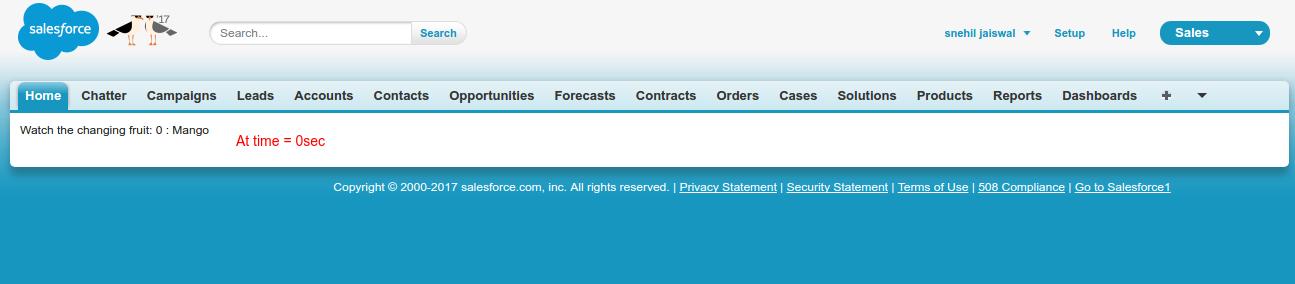
Output
# Initially time = 0 sec.
# After 15 sec

Support
That’s all for <apex:actionPoller> in visualforce page, still if you have any further query feel free to contact us, we will be happy to help you https://wedgecommerce.com/contact-us/.


