



In this blog, we will learn how to implement pagination using SetCon in Visualforce page. Let’s get started.
Pagination Using SetCon
Let’s start with Apex controller:
public with sharing class Pagination {
     /**
         * Webkul Software.
         *
         * @category  Webkul
         * @author    Webkul
         * @copyright Copyright (c) 2010-2016 Webkul Software Private Limited (https://webkul.com)
         * @license   https://store.webkul.com/license.html
         */
    Public Integer noOfRecords{get; set;}
    Public Integer size{get;set;}
    public ApexPages.StandardSetController setCon {
        get{
            if(setCon == null){
                size = 10;
                string queryString = 'Select Name, Type, BillingCity, BillingState, BillingCountry from Account order by Name';
                setCon = new ApexPages.StandardSetController(Database.getQueryLocator(queryString));
                setCon.setPageSize(size);
                noOfRecords = setCon.getResultSize();
            }
            return setCon;
        }set;
    }

    public List<Account> getAccounts(){
        List<Account> accList = new List<Account>();
        for(Account a : (List<Account>)setCon.getRecords()){
            accList.add(a);
            }
        return accList;
    }

    public pageReference refresh() {
        setCon = null;
        getAccounts();
        setCon.setPageNumber(1);
        return null;
    }

    public Boolean hasNext {
        get {
            return setCon.getHasNext();
        }
        set;
    }
    public Boolean hasPrevious {
        get {
            return setCon.getHasPrevious();
        }
        set;
    }

    public Integer pageNumber {
        get {
            return setCon.getPageNumber();
        }
        set;
    }

    public void first() {
        setCon.first();
    }

    public void last() {
        setCon.last();
    }

    public void previous() {
        setCon.previous();
    }

    public void next() {
        setCon.next();
    }
}
Here is the Visualforce Page:
<apex:page controller="Pagination" >
    <!--
        /**
         * Webkul Software.
         *
         * @category  Webkul
         * @author    Webkul
         * @copyright Copyright (c) 2010-2016 Webkul Software Private Limited (https://webkul.com)
         * @license   https://store.webkul.com/license.html
         */
     -->
    <apex:form >
        <apex:pageBlock id="pb">
            <apex:pageBlockTable value="{!Accounts}" var="a">
                <apex:column value="{!a.Name}"/>
                <apex:column value="{!a.Type}"/>
                <apex:column value="{!a.BillingCity}"/>
                <apex:column value="{!a.BillingState}"/>
                <apex:column value="{!a.BillingCountry}"/>
            </apex:pageBlockTable>
            <apex:panelGrid columns="7">
                <apex:commandButton status="fetchStatus" reRender="pb" value="|<" action="{!first}" disabled="{!!hasPrevious}" title="First Page"/>
                <apex:commandButton status="fetchStatus" reRender="pb" value="<" action="{!previous}" disabled="{!!hasPrevious}" title="Previous Page"/>
                <apex:commandButton status="fetchStatus" reRender="pb" value=">" action="{!next}" disabled="{!!hasNext}" title="Next Page"/>
                <apex:commandButton status="fetchStatus" reRender="pb" value=">|" action="{!last}" disabled="{!!hasNext}" title="Last Page"/>
                <apex:outputText >{!(pageNumber * size)+1-size}-{!IF((pageNumber * size)>noOfRecords, noOfRecords,(pageNumber * size))} of {!noOfRecords}</apex:outputText>
                <apex:commandButton status="fetchStatus" reRender="pb" value="Refresh" action="{!refresh}" title="Refresh Page"/>
                <apex:outputPanel style="color:#4AA02C;font-weight:bold">
                    <apex:actionStatus id="fetchStatus" startText="Fetching..." stopText=""/>
                </apex:outputPanel>
            </apex:panelGrid>
        </apex:pageBlock>
    </apex:form>
</apex:page>
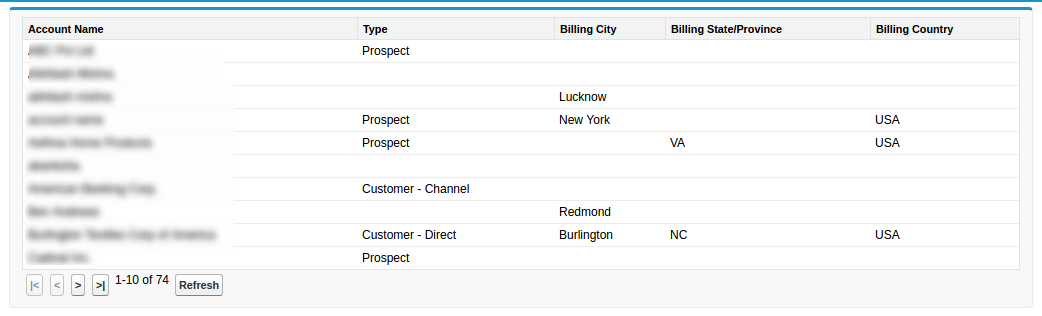
Output
Here is the output:
Support
That’s all about how to implement pagination using SetCon in Visualforce page, for any further queries feel free to contact us at:
https://wedgecommerce.com/contact-us/
Or let us know your views on how to make this code better, in comments section below.